
Why Website Owners Need to Understand These Three Files?
All three are small text files in your website’s root directory, and all three help outside systems understand and interact with your content. However, they are not the same, and using one instead of the other can lead to actual issues, such as missing pages in search engines or keyword optimizers misunderstanding your content policies. Let’s now look at each of these files in plain English, what they do, and how they fit together in a healthy web maintenance routine llms.txt vs robots.txt vs sitemap.xml. If you are a new business founder establishing your first website or an enterprise digital manager reviewing an existing site, this guide will help you ensure that each of them is used properly.
robots.txt vs sitemap.xml: The Original Duo
Let’s first revisit the two files that have helped define Web crawling since its inception:
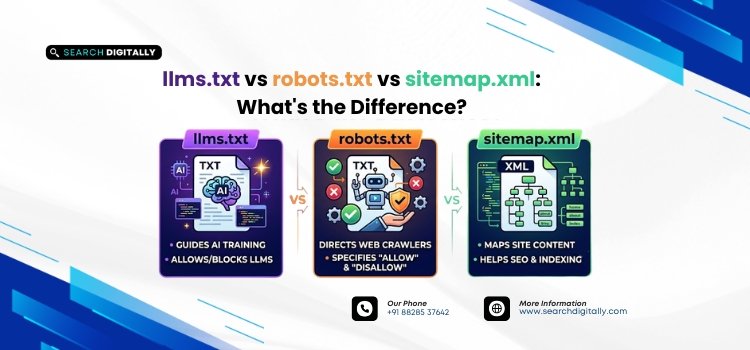
robots.txt is a simple text file, located in the root of your domain, that tells search engine crawlers where they can and can’t go on your site. It’s essentially a set of instructions, a gatekeeper that controls crawler behavior. For example, you might disallow crawlers from indexing your admin panel or a staging environment while allowing full access to your public pages.
sitemap.xml, on the other hand, is not about restriction; it’s about guidance. It is a well-formatted XML document that contains a list of all the important links on your website, with metadata such as the last updated date and the priority of the link. Instead of telling crawlers where not to go, a sitemap tells them where to go, helping search engines discover pages that might otherwise be missed, especially on large or newly launched sites.
So when comparing robots.txt vs sitemap.xml, the key distinction is this:
|
File |
Purpose |
Controls |
|
robots.txt |
Restricts or permits crawler access |
Where crawlers cannot go |
|
sitemap.xml |
Lists site URLs for discovery |
Where crawlers should go |
The Arrival of llms.txt: A New Standard for AI
The latest addition to this trio is llms.txt, a file designed not for web crawlers, but for Large Language Models (LLMs) and other generative AI tools. As AI tools became more sophisticated, website owners needed a way to communicate their preferences regarding AI training and usage directly to these models. This is where llms.txt comes in. It is a machine-readable file that allows site owners to set rules for how AI tools should interact with their content, much like robots.txt sets rules for web crawlers.
Unlike robots.txt, which is a standard protocol supported by all major search engines, llms.txt is a newer convention that is gaining traction but is not yet universally adopted. However, it represents an important step towards transparency and control in the age of AI. By understanding llms.txt vs robots.txt, you can ensure that your website is accessible to the search engines you want while also setting clear boundaries for AI tools that may use your content for training or other purposes.
Real-World Examples: When to Use Each File
Let’s look at a few scenarios to understand when you would use each of these files:
Scenario 1: The E-commerce Launch
Imagine you’re launching a new online store. You want search engines to find all your product pages quickly, so you create a sitemap.xml and submit it to Google Search Console and Bing Webmaster Tools. However, you also have a staging server where you’re testing new designs. You would use robots.txt to disallow crawlers from accessing your staging site, ensuring that only the live version appears in search results. Finally, you decide to use an AI-powered tool to help you write product descriptions. To control how this tool uses your content, you create an llms.txt file that specifies your terms of use.
Scenario 2: The Corporate News Site
For a large corporation with a newsroom, managing content access is crucial. You’d want your news articles to be indexed by search engines, so a sitemap.xml is essential. You might also have certain sections of your site, like investor relations documents, that you want to restrict access to, making robots.txt a valuable tool. Additionally, if you’re using AI-powered analytics tools to monitor news coverage and trends, you’d create an llms.txt to set guidelines for how these tools can use your content.
Scenario 3: The University Research Portal
Universities often have vast amounts of data, including research papers and student projects. A sitemap.xml would help ensure that all valuable research is discoverable by search engines. You might also have areas of the site that contain sensitive information, requiring robots.txt to restrict access. Furthermore, with the rise of AI research tools, an llms.txt file would be important for specifying whether and how AI models can access and use the university’s research data.
These examples highlight that these three files serve distinct purposes, and using them together creates a comprehensive system for managing your website’s interaction with search engines and AI tools.
Tips for Using llms.txt, robots.txt, and sitemap.xml Effectively
To make the most of these files, consider the following best practices:
- Keep them updated Regular updates ensure that search engines and AI tools have the latest information about your site.
- Test regularly Use tools like Google Search Console to verify that your robots.txt and sitemap.xml are working as expected.
- Understand the limitations Robots.txt is a guideline, not a command, and while llms.txt is gaining adoption, not all tools may honor it yet.
- Integrate with other SEO practices These files work best when combined with other SEO efforts like proper tagging and structured data.
llms.txt vs robots.txt vs sitemap.xml: A Quick Comparison
|
File |
Primary Audience |
Main Purpose |
Format |
|
robots.txt |
Search engine crawlers & bots |
Controls what bots can/can’t crawl |
Plain text with directives |
|
sitemap.xml |
Search engine crawlers |
Lists pages to help discovery & indexing |
Structured XML |
|
llms.txt |
AI language models |
Summarizes site content for accurate AI use |
Markdown-style text |
The core distinction in llms.txt vs robots.txt vs sitemap.xml comes down to intent. robots.txt manages permissions, sitemap.xml manages discovery, and llms.txt manages context for AI systems.
Conclusion
Understanding the difference between llms.txt, robots.txt, and sitemap.xml is becoming essential as AI-powered discovery grows alongside traditional search. While robots.txt controls crawler permissions and sitemap.xml ensures full page discovery for search engines, llms.txt serves a different purpose altogether, offering AI models a concise, curated understanding of your website’s most important content. Rather than replacing the older standards, this new file complements them, and together they form a more complete strategy for staying visible across both search engines and AI assistants.
FAQs
Q1. Do I need an llms.txt file if I already have a sitemap.xml?
Yes, they serve different purposes. Your sitemap.xml helps search engines discover all your pages, while llms.txt gives AI models a curated summary of your most important content, so having both can strengthen your overall discoverability.
Q2. Can robots.txt block AI models from accessing my site the same way it blocks search engines?
Some AI crawlers do respect robots.txt directives, but it depends on the specific AI company’s crawler and whether it complies with the standard, so it shouldn’t be treated as a guaranteed method for controlling AI access.
Q3. Is llms.txt an officially recognized web standard like robots.txt and sitemap.xml?
Not yet in the same formal sense; it’s an emerging convention adopted voluntarily by some websites and AI tools, and its adoption and specifications may continue to evolve.